Tampilkan postingan dengan label scroller. Tampilkan semua postingan

Kamis, 05 Desember 2013

Scroller Gallery 2 - Recent Posts Teaser WordPress (Galleries)

Intro – top


DZS Scroller Gallery is the ultimate media gallery that you can use for showcasing your portfolio, photographs or even video shots. The gallery consists of thumbs layed out in a grid format that can have a description and link set on them. The link can also be a lightbox link so it can pop up a lightbox like ZoomBox 2 to launch images or videos.


Features


  • supports any image size, layout will be made automatically via Masonry

  • insanely easy to use just add the items in the admin panel, then include it into your page via a simple
    shortcode [scrollergallery id=”theid”]
  • fully responsive it goes from mobile to HD. You can place it in any element and it will
    adapt to it’s width

  • fully skinable via CSS

  • custom lightbox one of a kind, custom-built lightbox included

  • lightbox galleries separate items in the same gallery by lightbox galleries

  • unlimited galleries have unlimited galleries in the DZS Admin Panel V2. You can have unlimited
    galleries on any page too.

  • inline content support – you can have videos or any other html content on the thumb or the description

  • compatible with iPhone / iPad

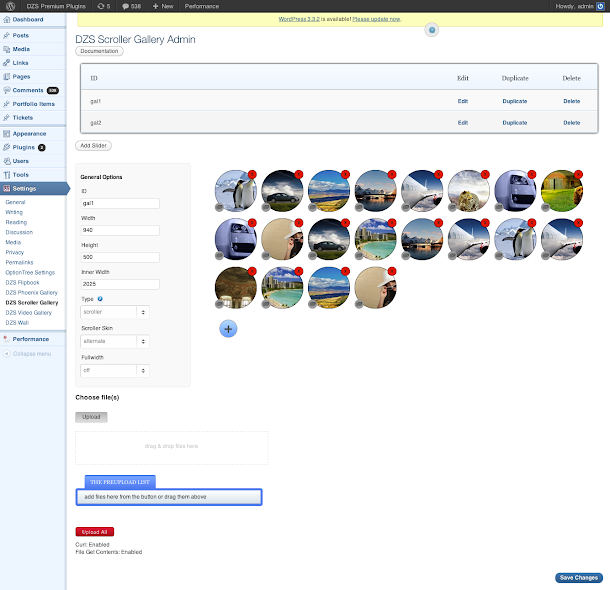
  • extensive admin panel – admin panel with lots of options to make the gallery as customizable as possible, yet easy to use. Comes with a drag & drop html5 uploader too! And awesome functionality like drag & drop for items, duplicate galleries etc. to make your life easier while editing the gallery. You can setup unlimited number of galleries in the admin as well as put them in the content.

  • backup database / import, export feature - keep your database safe and do regular backups via the Export Database feature included with this plugin.

  • easy to install - install and get this plugin ready in less then three minutes. Add it to your content via a simple shortcode – [scrollergallery id=”theidyousetintheadmin”] .


Updates


For updating, disable and delete the previous version, and install the new downloaded one. Or just unpack the zip you get from the download and overwrite the previous folder from wp-content/plugins/


UPDATE 1.01 [ 07/03/2013 ]


  • [FIX] a undefined index bug


What do you get?


  • Scroller Gallery 2 WordPress plugin – get creative!

  • sample data – the preview admin configuration which you can import in your own

  • documentation – extensive documentation on how to install & configure the plugin ( check the readme folder after you unpacked the package )

  • free updates – even if the value of this gallery increases with upcoming updates, you will get them for free

  • free support – for installation via our forum -> http://digitalzoomstudio.net/support/ this is the fastest form of support


Admin Preview


Wordpress Image & Content Scroller with Lightbox (Galleries)


This is a WordPress plugin for the jQuery Thumb Scroller. The plugin provides a comprehensive management system for your thumb scrollers and its slides, allowing an easy way to create a horizontal or vertical gallery for your WordPress site.


Features:


  • Horizontal or vertical orientation.

  • Responsive mode available.

  • Load different content for slides, including images, flash, iframe, ajax, or inline content.

  • Caption box available for each slide, including different mouseover effect, alignment, and positioning.

  • Different control types and navigation buttons available.

  • Slide show can be configured with auto play and controlled by play button, mouseover, or scroller interactions.

  • Easy to use admin system for thumb scroller management.

Scroller Gallery 2 - Recent Posts Teaser WordPress (Galleries)

Intro – top


DZS Scroller Gallery is the ultimate media gallery that you can use for showcasing your portfolio, photographs or even video shots. The gallery consists of thumbs layed out in a grid format that can have a description and link set on them. The link can also be a lightbox link so it can pop up a lightbox like ZoomBox 2 to launch images or videos.


Features


  • supports any image size, layout will be made automatically via Masonry

  • insanely easy to use just add the items in the admin panel, then include it into your page via a simple
    shortcode [scrollergallery id=”theid”]
  • fully responsive it goes from mobile to HD. You can place it in any element and it will
    adapt to it’s width

  • fully skinable via CSS

  • custom lightbox one of a kind, custom-built lightbox included

  • lightbox galleries separate items in the same gallery by lightbox galleries

  • unlimited galleries have unlimited galleries in the DZS Admin Panel V2. You can have unlimited
    galleries on any page too.

  • inline content support – you can have videos or any other html content on the thumb or the description

  • compatible with iPhone / iPad

  • extensive admin panel – admin panel with lots of options to make the gallery as customizable as possible, yet easy to use. Comes with a drag & drop html5 uploader too! And awesome functionality like drag & drop for items, duplicate galleries etc. to make your life easier while editing the gallery. You can setup unlimited number of galleries in the admin as well as put them in the content.

  • backup database / import, export feature - keep your database safe and do regular backups via the Export Database feature included with this plugin.

  • easy to install - install and get this plugin ready in less then three minutes. Add it to your content via a simple shortcode – [scrollergallery id=”theidyousetintheadmin”] .


Updates


For updating, disable and delete the previous version, and install the new downloaded one. Or just unpack the zip you get from the download and overwrite the previous folder from wp-content/plugins/


UPDATE 1.01 [ 07/03/2013 ]


  • [FIX] a undefined index bug


What do you get?


  • Scroller Gallery 2 WordPress plugin – get creative!

  • sample data – the preview admin configuration which you can import in your own

  • documentation – extensive documentation on how to install & configure the plugin ( check the readme folder after you unpacked the package )

  • free updates – even if the value of this gallery increases with upcoming updates, you will get them for free

  • free support – for installation via our forum -> http://digitalzoomstudio.net/support/ this is the fastest form of support


Admin Preview


Rabu, 04 Desember 2013

Swiper - Responsive Element Slider with Touch (Sliders)

Swiper is a Responsive element slider. Each element is a separate object which has a separate target link. Collection of elements makes a Slide.


Main Features:


  • -Fully Responsive

  • -Hardware Accelerated touch support

  • -Built With Bootstrap

  • -Well documented

  • -Easy to modify code

  • -Best for showcasing portfolio, clients, etc.


  • Support


    Feel free to drop your comments/ feedback in comments section. Mail us through our profile contact form for any support related questions.

    Everslider - Responsive jQuery Carousel Plugin (Sliders)


    Everslider is fully responsive, mobile optimized jQuery carousel plugin. It uses CSS3 transitions for animations with fallback to jQuery. Supports unlimited slides with any content. Everslider recognizes touchswipe, mousewheel and keyboard interactions and works in vast range of browsers starting with IE7 up to mobile browsers.


    • Fully responsive and mobile friendly

    • Retina-ready controls (PSD included)

    • Hardware CSS3 transitions with fallback to jQuery

    • Works in IE7+ and on Android and iPhone

    • Keyboard and mousewheel support

    • Drag and touchswipe support

    • Three carousel modes + autoplay (ticker)

    • More than 30 configuration options

    • API and callbacks

    • Unlimited slides that can have any content

    • Simple usage and clear documentation
    • Lightweight (only 20KB on disk)

    • Conflict-free jQuery plugin

    • JSHint compliant code


    Update to version 1.1 (30 Jul 2013)


    - refactored ticker code
    - added option to permit page scroll by vertical swipe gesture from within plugin
    - fixed problem when using Everslider with prototype.js
    - fixed flickering of ticker pause/play controls in Safari
    - fixed problem randomly preventing Everslider to resize when ticker is enabled


    Update to version 1.2 (12 Aug 2013)


    - added preloading
    - fixed timing for slidesReady() callback
    - “moveSlides” option can now accept special “auto” value to move exactly visible amount of slides
    - structure changes. Specifically class “es-slide” for individual slides was replaced with “es-slides” for whole UL list. Check instructions in documentation to update your code accordingly


    Update to version 1.3 (29 Sep 2013)


    - fixed problem with CSS3 animations on iOS7
    - fixed bug that was causing Everslider to become unresponsive on small screens in certain conditions
    - added new “syncHeight” option to dynamically adjust carousel height based on visible slides


    Update to version 1.4 (8 Oct, 2013)


    - added “fade” animation affect


    Update to version 1.4.1 (21 Oct, 2013)


    - fixed inability to set carousel items margin to 0 through itemMargin option
    - fixed issue with fitDelay and fitDuration options if they are passed as strings
    - fixed problem with ticker timeout that was not including animation duration for different effects


    Update to version 1.5 (11 Nov, 2013)


    - redesigned preview/demo page – check now!
    - added new configuration option “tickerAutoPlay”
    - added custom jQuery events and classes that will help adding animations to carousel items that run in sync with main carousel transition
    - updated documentation with examples how to add animation to carousel slides


    Update to version 1.6 (15 Nov, 2013)


    - added new plugin option “tickerHoverDelay” that delays pausing/resuming carousel on mousehover
    - made “fade” animation effect bi-directional with “fadeDirection” plugin option to change direction
    - added new API function slideTo() to rewind carousel to any position
    - added code that prevents dragging of images and links when touchswipe is enabled


    Credits and sources

    Photos in preview are from http://www.morguefile.com

    Easy Scroller - jQuery Page Scroller (Navigation)

    Easy Scroller is a Premium jQuery Plugin which allows easy scrolling of your web site from Top to Bottom and vice versa. Easy Scroller Buttons are placed on top and bottom of the site. You can choose to place the Scroller Buttons on the left or right side in easyscroller function argument. This Plugin gives much comfort and the user can easily scroll your long web pages. Your visitors will love you for giving this feature on your site. We have 200 Scroller Button Styles to choose from. You can also choose your own custom button images by mentioning your image path in the easy scroller function argument.


    Features


    • 200 Button types(100 Transparent Buttons & 100 White Background Buttons) to choose from.


    • icons Preview

    • Show the Scroller Buttons in Left or Right side.

    • Slider control for Vertical and Horizontal positioning of the Scroller Buttons.

    • Should work in all major Browsers.

    • Simple and Easy to Use.


    Support


    If you have any problems or need help for this Plugin, don’t worry we are there. Register and open a support ticket on our site.

    Updates


    Version 1.4 on 12 November 2013
    - Opacity for Scroller Button Options Added

    Version 1.3 on 27 October 2013
    - Bug Fixed in Scroll Length

    Version 1.2 on 24 October 2013
    - Show Scroll Down Button on Page Load Option Added

    Version 1.1 on 23 October 2013
    - Scroll Time Option Added
    - Scroll Length Option Added

    Version 1.0 on 16 October 2013
    - Initial Release